David Bott, from OutsideOurBubble.com, explains how he gets Internet while on the road, what equipment he has, how to set everything up, etc. This is not a paid endorsement by David, so you get the straight scoop! As he says, it's a "quick and easy overview of what we use and how"--and he's an expert!
Showing posts with label wireless. Show all posts
Showing posts with label wireless. Show all posts
Sunday, August 24, 2014

Sunday, May 29, 2011
3G vs 4G: The Tortoise and the Hare
We recently purchased a 4G mobile hotspot from Verizon. It’s a tiny thing with magical powers. With just one press of a button, it turns the immediate area around it into a Wi-Fi hotspot. You can plug it into a power source, or it will run on batteries for about 4 hours.

A similar device, called the Mi-Fi, has been around for a couple of years, but those are 3G only. The 4G Mi-Fi is coming soon.
What does 4G Mean?
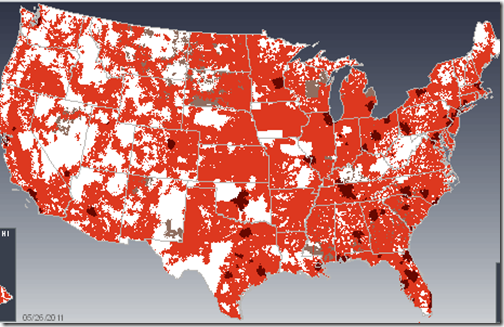
Without getting unnecessarily technical, we are talking about the technology that Cellular communications companies use to deliver wireless Internet connectivity. The ‘G’ stands for ‘Generation’ so 3G is third generation technology and 4G is fourth generation technology. 4G is better. It’s faster and it goes farther. That’s the good news. The bad news is that it exists only in limited areas. Below is Verizon’s coverage map, 4G is represented by the dark splotches, the red is 3G coverage, and the white is no coverage at all.
How Fast is 4G?
We live in our motorhome and happened to be staying in a friend’s driveway in Franklin, Tennessee, just south of Nashville. It is a solid 4G area – and it was exciting to use our 4G connection. Click a link – you’re there. Watch a video all the way thru – no hesitations. What a joy! For those of you who like numbers, I ran a speed test using testmy.net and here’s the result:

Read that as 9 1/2 Megabits/per second. A really good 3G speed would be 500Kbps – that’s 500 Kilobits/second, or 1/2 Megabit/per second. We were browsing the Internet at 20 times normal speed! We never wanted to leave. This was not only 4G, but it was extra fast 4G.
The 3G signal available from our same location was horrible. It was extra bad 3G. Here’s a screen shot of that speed test:

That’s just over 1/4 Mbps! Our spot in Franklin, Tennessee is the poster child for why you want a new 4G device. With it, using the Internet was a joy. Without it was torture.
Data Limits
In the Tortoise and the Hare, the blazing fast bunny runs out of energy. With our blazing fast 4G Internet connection, we quickly ran out of our data allotment. Our mobile hotspot device was on a $49/mo plan for 5 Gigabytes of data transfer. After one week and 4 Gigabytes of usage, we changed our plan to the $80/mo for 10 Gigabytes of data. Today, May 28, we’re at 9.88 Gigabytes. We’re in Ohio now, outside of any 4G area and we’re using our 3G Droid cellphones, tethered to our computers for Internet access. Verizon’s penalty for going over our allotment really isn’t too bad – $10/Gigabyte of overage. If we were still in the good 4G area that had lousy 3G, we would probably pay the overage.
To Buy 4G or Not to Buy 4G
If you’re going to buy a cellular wireless Internet device now anyway, why not get 4G as long as it also does 3G? Notice the lights in my picture above of our mobile hotspot – there’s a 4G indicator light as well as a 3G indicator. If it can’t find any 4G signal, it will connect with a 3G. If you have a 3G only device – you’ll be very disappointed in Franklin, Tennessee!
If you aren’t already planning on buying such a device, then it’s a harder decision. Is it worth upgrading when 4G is still so rare? Pay close attention to the coverage map for your provider before deciding. Geeks like us just gotta have it!
Your Mileage May Vary!
Don’t take any speed test, or anyone else’s (even ours!) experience as gospel. Speeds vary from minute to minute, mile to mile, and computer to computer. This story is useful just to let you know how drastic the speed difference *can* be between 3G and 4G.
by Chris Guld, Geeks on Tour
Geeks on Tour is a membership website with hundreds of Tutorial Videos on topics of interest to travelers, such as managing digital photos with Picasa, Route-Planning with Streets and Trips, and sharing your travels with a website using Blogger. Members can view all of the videos in the Learning Library.
Monday, May 9, 2011
My On the Road Data Diet
How I Exceed My 5 Gigabyte Limit with Verizon

Our contract allows 5 Gigabytes of data usage per month. Check the image at right and you’ll see that we’ve used over 4 Gigabytes and we’re only on day 8 of 31! Looks like I’ll have to go on a data diet for the rest of the month.
What’s a Gigabyte?
Data usage is simply Internet use as opposed to voice. Voice plan usage from your cellular provider is measured in minutes, Internet/Data usage is measured in Megabytes/Gigabytes. Data usage is also referred to as Downloading, Uploading, or Bandwidth. Think of it like a stream of water going thru a hose, email and other text is just a trickle, video is a firehose. You’re measured by how much data is going thru the connection - what you’re looking at, not the time you’re online.
Each Gigabyte is roughly 1,000 Megabytes. We teach people that 5 Gigabytes is usually plenty for a month of one person doing normal browsing, email reading and maybe some Youtube watching. But, if you share that connection with multiple computers, or you watch a lot of video, then 5 Gigabytes won’t be nearly enough.
Just to give you an idea, a large, high resolution picture that you view on the web may consume about 1 Megabyte. You’d have to view 1,000 of those pictures to hit one Gigabyte of usage. Over the period of one month, you might view 1,000 pictures on the web. Watching a typical, standard quality, 3-4 minute Youtube video will use roughly 10 Megabytes. So you could watch 100 of those for 1 Gigabyte of data usage. See this article from the folks at evdoinfo.com for a chart: What does 5GB (Gigabytes) Get Me? Here’s another article for more detailed info on data usage for videos. The only thing we tell people they cannot do is to watch full length movies. Watching one Netflix movie online can use up to 2 Gigabytes of your allotment right there.
How Did We Go Over Our Limit?
We had not watched any online movies, so how did we rack up so much data usage so fast? First of all, for the whole winter season, we were in one RV park where we contracted with Bell South for a DSL line. DSL is nice and fast and has no limits. So, we got spoiled. We didn’t have to pay attention to data usage all winter. Now that we’re back on the road, we need to be paying attention. Both Jim and I are sharing our mobile hotspot Internet connection from Verizon.
Once I got a notice from Verizon, I did some checking. One culprit is my Windows Updates. I had automatically received Windows 7 Service Pack 1. I checked Microsoft’s site and learned that it was over 1 Gigabyte in size! We are also preparing to deliver a seminar remotely using Skype and screen-sharing. Our practice session probably cost us us a 1/4 Gigabyte. A couple days ago, I purchased the latest Microsoft Streets and Trips program and downloaded it. That was 1.3 Gigabytes! Pretty stupid on my part since I already had the trial version installed on my computer. We now have a 4G mobile hotspot from Verizon and we were so excited to be in a 4G area around Nashville … I may have watched a couple episodes of Glee on Hulu because it worked so well … hey, I call that research!
What Can You Do to Limit Your Data Usage?
We need to go on a data diet! Here are the things that we are going to do:
- Always check for good Wi-Fi and use it when possible.
- Stay aware of our current data usage by checking our account stats online at verizonwireless.com/myverizon and logging into our account. If you don’t know how to do that for your provider, give them a call and ask.
- Turn off automatic Windows Updates (Control Panel\System and Security\Windows Update) note: if you do this, make sure to do your updates manually whenever you’re in a good Wi-Fi area. Getting updates *is* very important.
- Turn off DropBox. DropBox is a great utility that synchronizes a folder of data across multiple computers. It does this by uploading them to a website and then downloading them to the other computers, so it uses double bandwidth (data transfer usage) going up and down! If I remember, I’ll turn it back on when I’m connected to a good Wi-Fi signal.
- Stay away from Netflix and Hulu
- Limit our Video Skype calls.
How Much Does it Cost When you go Over Your Allotment?
Verizon used to charge 25 cents per Megabyte of overage. That adds up quick! If you went over by a Gigabyte, that would cost $250! The fees today are much more reasonable – each Gigabyte of excess will be charged at $10/Gigabyte. Check with your provider and your contract to see what your overage charges are. If you’ve had your contract for a long time, you may even have an unlimited usage contract. If that’s the case … don’t lose it! Any change in your contract may get you started with a whole new contract – with new limitations. The unlimited usage contracts are highly desirable.
Can I Increase My Limits?
This depends on your provider and the plans they offer. Verizon does currently offer a 10Gigabyte contract for $80/month. We might just have to do that.
Kind of like those real diets … so often I give up and go buy some clothes in a larger size!

by Chris Guld, Geeks on Tour
Geeks on Tour is a membership website with hundreds of Tutorial Videos on topics of interest to travelers, such as managing digital photos with Picasa, Route-Planning with Streets and Trips, and sharing your travels with a website using Blogger. Members can view all of the videos in the Learning Library.
Saturday, April 9, 2011
Tethering your Smart Phone for Internet Access

Cellular Internet Service
Cellular has become the most popular method of connecting, and it is getting better with every new cell tower installation or upgrade. Verizon is the most popular service among RVers because they generally have the best coverage as you travel. You can buy USB cellular modems to plug into your computer or router, you can buy a Mi-Fi which is a small, standalone device that creates a personal Wi-Fi hotspot. Then, your computers, iPods, iPads, printers, etc. can connect to it.
Geeks on Tour Tether their Droid
We (Jim and Chris of Geeks on Tour) plan to get the new 4G Mi-Fi real soon now ... but for now, we're using our Droid smart phone to tether to our computers for Internet service. The video below was recorded last summer on the road and we demonstrate how we tether the Droid. For more information, see our website page on Wireless Internet.
This is one of our 'Gabbing with the Geeks' video blogs. It's from summer 2010.
Subscribe to:
Posts (Atom)